
← ZTools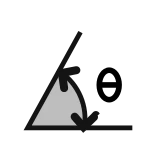
Dimension
zDimAngle
Corner angles
zDimAngle detects the corners formed by two neighboring straight segments and dimensions the angle. It supports degrees, radians and degrees-minutes-seconds. It always dimensions the interior angle.
Quick start
- Run
zDimAngle. - Pick curves, faces, Breps or meshes.
- The tool detects the corners between neighboring straight segments and dimensions them.
- Adjust the TEXT, DIMENSION and ARROW groups.
- Mark commits the dimensions. Cancel discards them.
A row at the top has three presets, Tiny, Small and Large Object. The parameters are in three group boxes: TEXT, DIMENSION and ARROW.
TEXT
- Unit Format: Degrees, Radians or DMS (degrees, minutes, seconds).
- Text Size: the height of the dimension text.
- Decimal Places: 1 by default. In DMS mode it sets the decimals of the seconds.
DIMENSION
- Label Offset: also the radius of the dimension arc itself.
- Text Offset: how far the number is pushed outward from the dimension arc, in addition to the arc radius. It is independent of Label Offset: Label Offset sets the distance of the arc from the corner vertex, and Text Offset pushes the number a further distance, so the number does not collide with the arrows.
ARROW
- Arrow Style / Arrow Size: the style and size of the arrows at the ends of the arc.
How the settings work together
- The text direction always follows the tangent of the dimension arc, as in a standard CAD angle dimension, and is no longer fixed horizontal.
- DMS carries correctly (60 seconds become a minute, 60 minutes become a degree), so you never see a wrong value like
44°59'60.0".
Input requirements
Only corners where both neighboring segments are straight are dimensioned. Corners that involve a curve are not. An angle outside 1 to 179 degrees is skipped (treated as collinear or folded back on itself, to avoid a degenerate dimension). The angle between two straight lines joined by a fillet is also dimensioned, by extending the two lines to their intersection.
Good to know
- If you close the dialog without pressing Mark, the tool removes its empty layer.
- The preview shows the corner position with gray helper lines that are not written to the document. Only Mark makes them real.