
← ZTools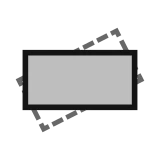
Geometry
zStraighten
Align the longest edge to the X axis
zStraighten is a one-shot command with no dialog. It rotates each selected object about the center of its own bounding box so that its longest straight edge is parallel to the world X axis.
Quick start
- Run
zStraighten. - Select one or more objects and press Enter. The command runs at once.
How it works
There are no settings. The tool collects every straight segment of the object (from curves, Brep edges, extrusion edges and mesh topology edges), and uses the angle of the single longest segment as the reference for the rotation. It is not a length-weighted average. This is deliberate, so that at least one edge ends up exactly horizontal.
Good to know
- If no straight segment is found, the object is not rotated and stays as it is.
- Each object rotates about its own bounding-box center, not about the common center of the whole selection.